
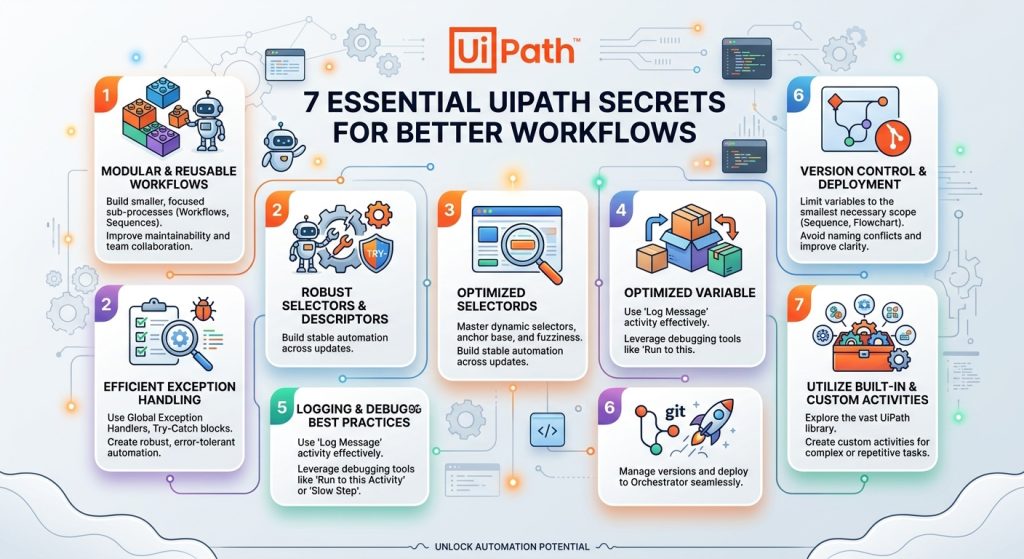
In today’s fast-paced digital ecosystem, business automation is an absolute necessity for staying competitive. Unlocking maximum efficiency in software execution requires mastering the 7 Essential UIPath Secrets for Better Workflows to boost speed, reduce errors, and streamline operations. Robotic Process Automation (RPA) has transformed how organizations handle repetitive tasks, with UIPath at the forefront. However, many developers only scratch the surface of what this platform can achieve. Applying the 7 Essential UIPath Secrets for Better Workflows will elevate your automation architecture and deliver maximum return on investment.
Unlocking Peak Automation Performance
To build stable and maintainable scripts, engineering teams must look beyond basic recording tools. Implementing the 7 Essential UIPath Secrets for Better Workflows ensures processes operate seamlessly under high data loads and unpredictable environments.
1. Master the Robotic Enterprise Framework (REFramework)
Many beginners build workflows using simple linear sequences. While this works for tiny tasks, enterprise-grade automation requires robust exception handling. REFramework provides a standardized structure equipped with built-in logging, application initialization, retry mechanisms, and transaction management. Transitioning logic into REFramework is one of the core 7 Essential UIPath Secrets for Better Workflows because it ensures bots fail gracefully and recover automatically without human intervention.
2. Prioritize Background Execution over Hardware Events
Relying on physical clicks or screen coordinates leads to fragile bots that break whenever screen resolution or window focus changes. Whenever possible, use Simulate Click, Send Window Messages, or modern API interactions. Background execution skips the graphical user interface entirely, resulting in bots that execute exponentially faster and run reliably in headless virtual machines.
3. Implement Centralized Asset and Credential Management
Hardcoding variables, file paths, or credentials inside workflow files creates severe security risks and maintenance headaches. Leveraging UIPath Orchestrator Assets for configurations and Credentials for sensitive data allows you to update connection strings or passwords centrally across dozens of processes without modifying the underlying source code.
4. Optimize Selectors with Dynamic Visual Tracking
Unstable selectors are the leading cause of unexpected process halts during production runs. Instead of static selectors that rely on unstable attributes like row indexes or precise titles, utilize dynamic variables, wildcards (*, ?), and relative anchor positioning. Designing resilient selectors keeps automation running smoothly even when web interfaces undergo frequent visual updates.
5. Enforce Standardized Modular Architecture
Rather than creating massive workflow files containing hundreds of activities, break solutions down into small, highly specialized, and reusable .xaml modules. Combining modular architecture with the 7 Essential UIPath Secrets for Better Workflows simplifies debugging, enables parallel team development, and allows component reuse across multiple distinct automation projects.
6. Utilize Advanced Logging and Custom Metrics
Basic logging tells you if a bot failed, but comprehensive logging reveals why and where performance bottlenecks occur. Incorporating customized log fields and logging business metrics directly into Orchestrator gives management full operational visibility. Knowing exact execution times, transaction counts, and exception rates allows teams to continuously refine workflows for maximum throughput.
7. Leverage Global Exception Handlers and Retry Loops
Unexpected system pop-ups, network blips, or delayed application responses can derail execution. Implementing a Global Exception Handler alongside scoped Try Catch blocks ensures that transient errors trigger controlled retries or alert notification emails rather than complete workflow failure. Mastering proactive error recovery completes the 7 Essential UIPath Secrets for Better Workflows.
Why Choose PT. Ichiru System Innovation for Your RPA Needs?
Implementing these advanced UIPath methodologies requires deep technical expertise and strategic planning. While mastering the 7 Essential UIPath Secrets for Better Workflows is vital, executing them effectively within an enterprise environment demands a trusted automation partner.
PT. Ichiru System Innovation specializes in delivering tailored, high-performance Robotic Process Automation solutions. Our expert team builds scalable automation architectures designed to reduce operational costs, eliminate human error, and accelerate business growth. From initial process discovery and workflow design to full Orchestrator management and post-deployment support, we ensure your automation initiatives deliver measurable business value. Partner with Ichiru System Innovation today to transform your operational efficiency.
External Resources: